
How to see only photos and videos on X
If you follow artists, photographers or video accounts, text posts and reposts get in the way. Here is how to get a timeline that is only pictures and video.
Updated November 2026
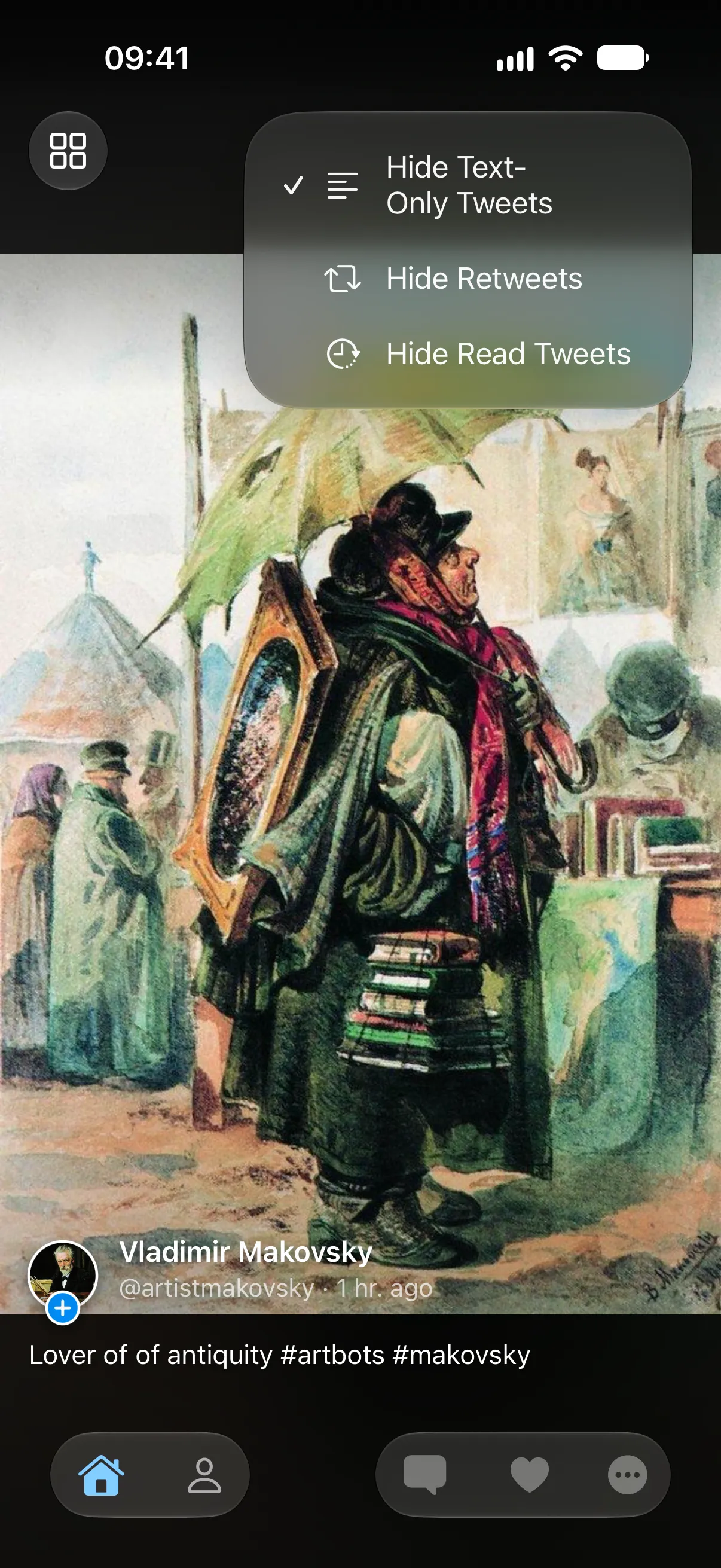
What X lets you do
X’s app has no setting that hides every post without media. You can open one account’s Media tab to see only that account’s photos and videos, but not for your whole timeline.
Reposts can be turned off only one account at a time, from that account’s profile, and the change applies to new reposts only. On the web, some people use browser extensions to filter the timeline, but those don’t work in the phone app.
Hide text-only posts and reposts in TweeTok
TweeTok has both filters built in, for any timeline or list, free.
- Open the timeline or list you want to filter.
- Tap the filter button next to the timeline name at the top.
- Turn on Hide Text-Only Tweets to keep only posts with images or video.
- Turn on Hide Retweets to keep only posts written by the accounts you follow.
Then make the pictures bigger
Once the timeline is only media, switch to full screen and swipe through one post at a time, or use the two-column grid to scan a whole page of pictures. The same filters work on Apple TV and Android.